Discover
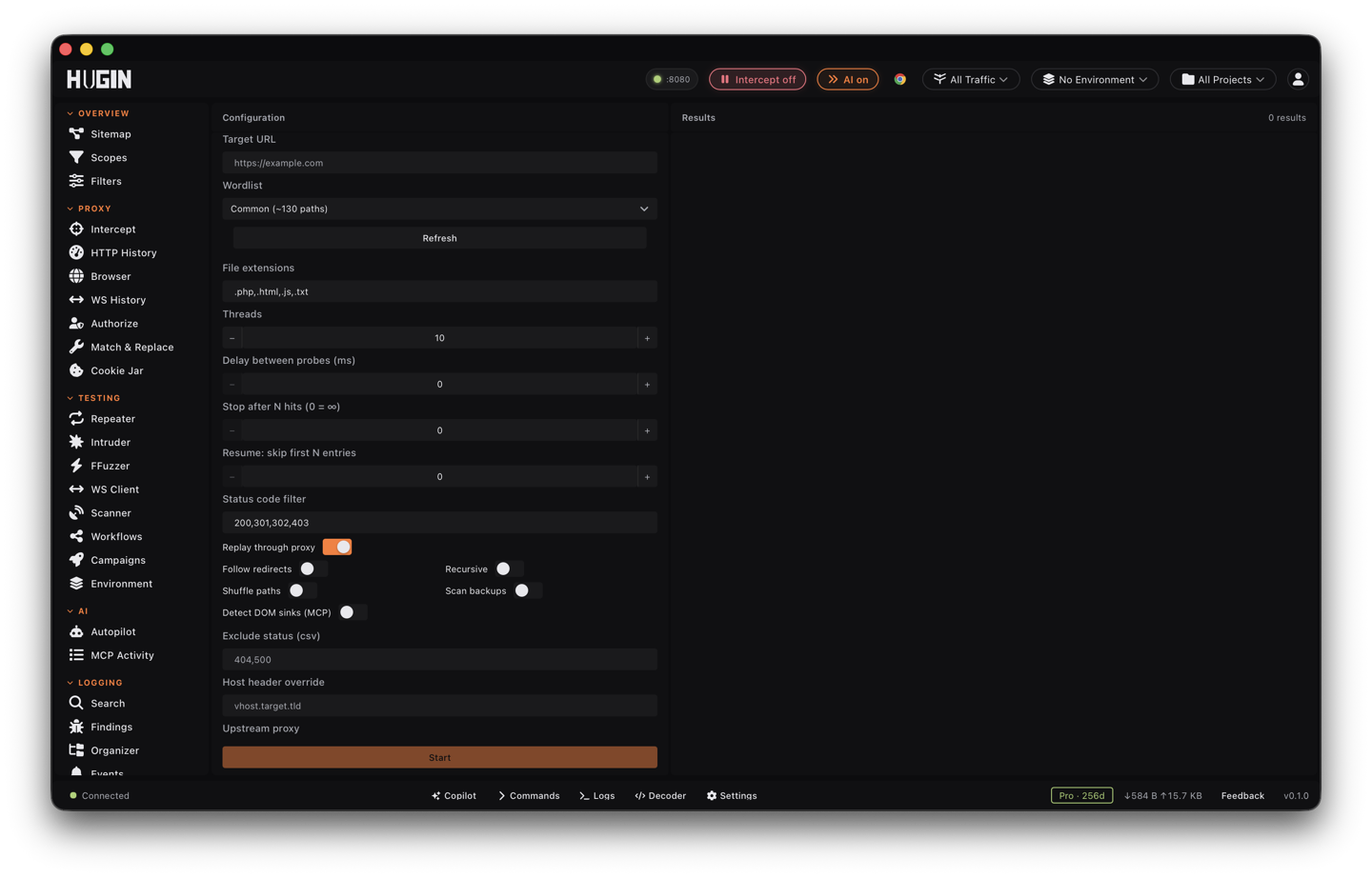
Find unlinked endpoints — admin panels, backups, .git, .env — with soft-404 calibration that kills false positives.
The Crawler finds what the app links to. Discover finds
what it doesn't: hidden directories, forgotten admin panels, backup files, .git,
.env, debug endpoints. It requests likely paths from a wordlist and reports the
ones that really exist. It ships in Community — no license needed.
Soft-404 calibration
Many apps answer every URL with 200 — a single-page-application (SPA) catch-all, a soft 404. Discover calibrates before it trusts a single hit: it fires several requests to random, non-existent paths, fingerprints the "not found" response (status plus a hash of the body, with a small length tolerance for pages that vary by a timestamp or request id), and then reports only the paths that genuinely differ. The samples have to agree on status and body before a baseline is trusted, and Discover rechecks that baseline as the run goes — roughly every couple hundred confirmed hits — so a subsection with its own custom 404 page doesn't start leaking fake 200s.
Calibration is the difference between a clean list of real findings and a thousand fake 200s. The hits Discover shows you are worth opening.
Sensitive-path heuristics
Discover knows which hits matter. Instead of an anonymous status-code row, a high-value path is classified to a Common Weakness Enumeration (CWE) id and a severity:
- Exposed version-control directory (
.git,.svn,.hg,.bzr) — CWE-527, High. - Exposed credential or secret file (
.env, cloud creds,kubeconfig,id_rsa) — CWE-538, Critical. - Exposed backup or source archive (
.bak,.old,.sql,.zip,.tar.gz, …) — CWE-530, High. - Exposed debug or management endpoint (actuator,
server-status,phpinfo,/metrics,/swagger,/graphql, Jolokia) — CWE-200, Medium. - Administrative interface reachable (
/admin,/manager,/wp-admin,/phpmyadmin) — CWE-200, Low.
A 401 or 403 still counts as present — a locked admin panel or a denied .env
proves the path exists, so Discover keeps it. But a denied sensitive file is the
secure configuration, not a leak: a /.env that returns 403 is downgraded to Info,
while the same /.env served at 200 stays a Critical exposure. A served hit on a
high-signal path (.env, .git, secrets, credentials) is auto-promoted into
Findings, with the URL's auth-bearing query stripped.
Turn on Detect DOM sinks and Discover also scans each response body it already
fetched — no extra request — for DOM-XSS sinks (innerHTML, eval,
document.write, …) and the sources that feed them (the URL, cookies, storage), so
a discovered script that builds the page from the URL is flagged for follow-up.
Pick a wordlist
Discover ships one built-in list and takes your own:
Roughly 290 high-signal paths, ordered most-likely-first and grouped by attack class — admin and management, API and GraphQL, auth, debug and actuator, framework paths, version-control and infrastructure files, configs, backups, CI/CD, and data stores. Selected by default.
Pick Custom and paste a list, one path per line. Or drop wordlists into
~/.hugin/wordlists/ and they appear in the picker as custom:<name> (hit
Refresh after adding one). Files stream up to 4 MB; anything over 16 MB falls
back to common.
Every extensionless entry is also probed with each extension you list (default
.php,.html,.js,.txt), so admin becomes admin, admin.php, admin.html, and
so on.
Turn it on and Discover also probes .bak, .old, .zip, .tar.gz, and ~
variants of every path — the forgotten copy of a file the live one won't give up.
For ffuf-style FUZZ-keyword fuzzing with its own engine wordlists, reach for
FFuzzer; Discover is the structured content-discovery tool
with sensitive-path classification.
Recurse into what you find
Turn on Recursive and every directory-like hit becomes a new scan rooted at
that path, so Discover walks /api into /api/v1 into /api/v1/admin without you
re-seeding. Three controls keep it from running forever:
- Depth stops at 3 levels deep.
- Queue cap holds at most 50 pending sub-scans; past that, the deepest subtree is dropped (logged, not silently lost).
- No recursion on 401/403. Discover only recurses into 200/301/302 directories. An auth-walled tree answers every sub-path with the same 403 and would loop forever; to walk one, carry credentials in the headers field (see Route the traffic) so the codes turn into 200s.
A visited-path set means the same directory is never queued twice in one run.
Pace the scan
Forced browsing is loud. Tune it to the target:
- Threads — 1 to 50 concurrent probes (default 10).
- Delay between probes — 0 to 5000 ms on top of the concurrency cap, for a target that rate-limits or that you'd rather not hammer.
- Adaptive backoff — a sustained run of 429 or 503 responses stretches the throttle automatically (the more in a row, the longer the pause, up to a few seconds), and only clearly-OK responses reset it, so one stray 404 mid-wall doesn't let the rate creep back up.
- Stop after N hits — cap the run once N results land (0 = unlimited), for a quick "is anything here" pass.
- Pause, Resume, Stop at any time. Pause holds the in-flight probes; Stop cancels them and drops the partial run.
- Resume: skip first N entries — restart a long run past where the last one stopped instead of re-probing from the top.
- Shuffle paths randomizes probe order; set
HUGIN_DISCOVER_SHUFFLE_SEED=<number>to make that order reproducible across operators.
Filter by status
Two filters decide what reaches the table:
- Status code filter (include) — only these codes are kept; default
200,301,302,403. Leave it empty to keep everything. - Exclude status — codes to drop even when the include filter would keep them,
for example
404,500.
The soft-404 baseline still applies on top of both, so a host that serves 200 for everything won't flood the include list.
Route the traffic
Replay through proxy is on by default. Every probe flows through Hugin's in-process proxy, so the traffic lands in History and passes your per-project scope, the intercept queue, the match-and-replace rules, and the audit log — discovery is captured like any other tool, not fired off to the side.
Point Upstream proxy at Burp or a SOCKS hop (http://, https://,
socks5://, socks5h://, socks4://, socks4a://, with optional user:pass@).
An explicit upstream wins over the in-process default.
Override the Host header for virtual-host discovery, and add custom headers
(one Name: Value per line) to carry an Authorization or Cookie into every
probe — the same session that turns an auth-walled tree's 403s into 200s for
recursion.
Every probe is scope-checked before it's sent: a path that resolves to an
out-of-scope host is refused, and switching projects mid-scan cancels the run so it
can't bleed across engagements. Two environment knobs handle awkward
infrastructure: HUGIN_DISCOVER_IPV4_ONLY=1 forces A-only resolution when a
target's IPv6 path is broken, and HUGIN_DISCOVER_DNS=host=ip,host2=ip:port pins
DNS for a run (CDN testing, internal hosts) without touching your system resolver.
Forced browsing hits a lot of paths fast and probes for files the target never meant to serve. Keep it on hosts you're authorized to test, mind the rate, and let the scope check do its job.
Read and route the results
Hits stream into a sortable table — Status, URL, Size, Content-Type, Time (response time), and Body Hash (the calibration fingerprint, so near-identical pages line up at a glance). A status-code histogram (1xx–5xx) plus a live req/s and error count ride above it, and the table caps at 500 rows with a Show all toggle so a 5000-hit run doesn't choke the view.
Expand a row for the full URL, size, content type, response time, and any DOM sinks and sources found. From a hit you can:
Open the URL as a fresh Repeater tab to start crafting an exploit request — no retyping.
Pop the hit in your external browser (http/https only) to eyeball it.
Each hit is tagged in-scope, out-of-scope, or unscoped against the active project — an out-of-scope hit is a stop-and-check signal.
Compare runs and export
A completed run that found something is saved per project, so the result table survives a restart and you build up a record of what a target looked like over time. (Cancelled runs and empty runs aren't saved, so the history stays useful.)
- Compare with the last run — diff two scans of the same target to see which paths appeared and which vanished. New paths since last time are exactly where to look; a path that disappeared is drift worth a note.
- Waterfall — read per-path timing to spot latency cliffs. A path far slower than its neighbours often means an expensive endpoint, a cache miss, or a throttle kicking in.
- Export CSV or JSONL — both strip auth-bearing query strings (tokens, session ids, API keys, passwords) by default, so a shared result file doesn't leak credentials. Flip Reveal auth in export only when you deliberately need the raw URLs. The response-body hash is never exported.
Feed anything interesting into Repeater or the Scanner, and pair Discover with the Crawler to cover both the linked and the unlinked surface.