Crawler
Map the attack surface — links, forms, and endpoints pulled from HTML and JavaScript — into History.
You can't test what you haven't found. The Crawler walks the target and feeds the attack surface into History as flows. Run it first so the rest of your tools have something to work on. It ships in Community — no license needed.
What it does
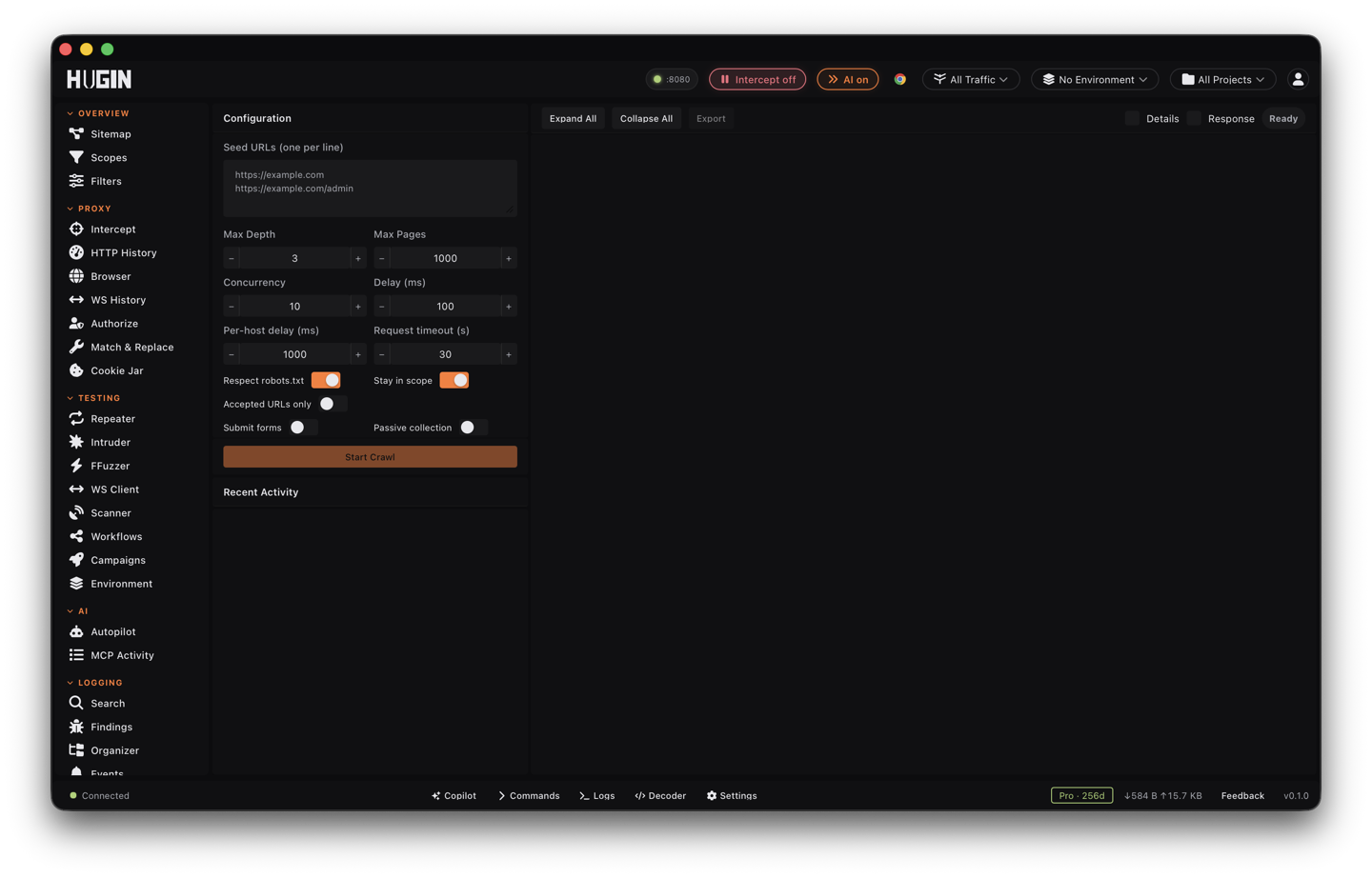
The core is a static HTTP crawl — a breadth-first (BFS) walk that respects
robots.txt and parses sitemap.xml, with per-host rate limiting and manual
redirect handling (each hop captured as its own flow). Defaults: depth 3, up to
1000 pages, 10 at a time. Every request and response it sends lands in History,
so anything it finds is one right-click away from Repeater, Intruder, or the
Scanner.
On each page it also extracts links, inline scripts, HTML comments, meta tags,
emails, phone numbers, inline event handlers (onclick, onerror, …), and a
Content Security Policy (CSP) analysis — all surfaced on the result. JavaScript
analysis runs by default; the next sections cover what it digs out and how to
point the crawl where you want it.
Run an authenticated crawl
Most of the interesting surface sits behind a login. To walk it as a logged-in user:
- Paste your session cookies (
name=valuepairs) from a logged-in browser, or carry the session in a header (see Route the traffic). - Set an auth-check URL — a page only an authenticated user can reach.
- Start the crawl.
Before it spawns a single worker, the Crawler hits the auth-check URL and proves the session actually authenticates. A login redirect, a 401, a 403, or a logged-out body means the proof failed. (No auth-check URL set? It proves against the first seed instead.)
The proof is fail-closed: in authenticated mode, a failed proof produces zero results — nothing reaches History, the Scanner, or access-control testing. A silently logged-out crawl is worse than none; fed into broken-access-control (BAC) checks it manufactures false positives, so Hugin refuses to hand one downstream.
Two things carry the session through a long crawl:
- Set-Cookie accumulation. The Crawler keeps a cookie jar seeded with your
session and folds in every
Set-Cookieit sees across redirects and pages, so rotating tokens and multi-step login chains keep working. - Require authenticated. Turn this on to force the proof even when your auth rides in a header rather than cookies.
If your auth is custom headers and most responses still come back logged-out, the Crawler warns at the end that the capture is effectively anonymous — a sign the header didn't take.
Keep the crawl in scope
The default: the seed host plus its subdomains. Turn subdomains off to pin to the exact host.
Regular expressions matched against the full URL. Exclude wins over include;
include overrides the seed-host rule. Exclude /logout, scope-in a CDN host,
whatever the engagement calls for.
Strict mode: follow only the seed's path subtree (and your include patterns). An
authenticated app shell that links to /pricing or a www. sibling won't drag
marketing pages into the crawl.
The crawl also obeys your global scope from the Scopes tab — a URL has to pass both gates to be followed.
Add as many seed URLs as you want; each one's host and path subtree joins the scope. The Crawler won't downgrade either: if a seed was HTTPS, it won't follow an HTTP version of the same path, which would leak your session cookies in clear.
Route the traffic
Send the crawl wherever you need it:
- Routing mode — Direct (default), through Mullvad's SOCKS5 proxy, through Hugin's own proxy (so every crawl request is captured in History too), or a custom HTTP/SOCKS proxy.
- Custom request headers — added to every request and every redirect hop.
This is how you inject
Authorization: Bearer …or a fixedCookieto carry a session the cookie field doesn't cover. - User-Agent rotation — fixed, round-robin, or random, drawn from your UA pool and picked per request. It defaults to real browser strings, not a crawler-identifying one.
- Accept invalid certificates — off by default, so a man-in-the-middle (MITM) can't swap responses on the static engine, the passive sources, or the robots/sitemap fetch. Turn it on only for a target that legitimately serves a broken certificate.
HTTP/3 (QUIC) and extra method probes (OPTIONS/HEAD per URL) are toggles too.
What it pulls out of JavaScript
JavaScript analysis is on by default. It's static — regex over the script text, no execution — so it's safe against anything you've already fetched. From every inline and external script it pulls:
12 types: AWS access keys (AKIA…) and secret keys, JWTs, Google (AIza…),
GitHub (ghp_… / github_pat_…), Slack (xox…), Stripe (sk_live_… /
pk_live_…), PEM private-key blocks, generic API keys, bearer / access / refresh
tokens, passwords, and long high-entropy strings. Values are redacted in the
report.
fetch, axios, XMLHttpRequest, and GraphQL calls, plus Express-style route
definitions — each tagged with its HTTP method when the code reveals it
(GET/POST/PUT/DELETE/PATCH), so you know how to hit it.
Environment-variable references (process.env, import.meta.env,
NEXT_PUBLIC_, REACT_APP_, webpack DefinePlugin) and source-map files that
can rebuild the original source.
WebSocket, Socket.IO, and SockJS endpoints; localStorage / sessionStorage
keys; and service / web / shared worker scripts.
It also flags weaknesses in the page's CSP. Anything that looks like an endpoint goes back into the crawl with its method hint, so a route discovered in a bundle gets fetched like any other link.
Render JavaScript-heavy pages
The static engine only sees the server's pre-JavaScript HTML. For a single-page application (SPA) that builds its UI in the browser, turn on headless rendering: a real Chromium drives the page and the same extractors run over the rendered DOM.
Headless rendering is compiled in behind a build-time cdp (Chrome DevTools
Protocol) feature and needs a Chromium binary present. Official builds include it;
if a build doesn't, requesting it quietly falls back to the static crawl instead
of failing. With it on you get:
- DOM-XSS probing with canaries. Before the page's own scripts run, Hugin
injects tagged canary values (
HUGIN_TAINT_…) into every query parameter and the URL fragment (or a probe parameter if the URL has none), hooks the dangerous sinks (innerHTML,document.write,eval, …), then checks which canaries reached a sink. Source-to-sink DOM-XSS findings come out with a severity, ready to confirm. - SPA auto-merge. For a page that looks JavaScript-built, the rendered DOM is merged back into the result — forms (file-upload forms included), the links the JS draws, and endpoints / source maps / workers / secrets from inline scripts that don't exist in the pre-JS body.
- Cookies, storage, and traffic. The headless run reads back the page's
cookies and
localStorage, records the XHR/fetch URLs and console errors it sees, and can capture a screenshot of the rendered page.
Don't get caught in a trap
A naive crawler drowns in calendars and infinite parameter permutations. The Crawler watches for and skips:
- Calendars — date paths like
/2024/01/15or/events/2024-06-15. - Parameter explosion — more than 15 distinct values for one query parameter on a host (session ids, cache-busters).
- Path-template repetition — more than 10 URLs sharing the same shape once
numbers, UUIDs, hashes, dates, and slugs collapse to
{param}. - Runaway depth — paths past 15 segments.
For deduplication it normalizes every URL first: drops the fragment and default
ports, sorts query parameters, strips tracking junk (utm_*, fbclid, gclid,
and friends), trims trailing slashes, and lowercases the host — so ?a=1&b=2 and
?b=2&a=1&utm_source=x count as one page.
Submit forms
Form submission is off by default — turn it on deliberately. With it on, the Crawler fills detected forms with test values, submits them, and feeds the response and any new URLs back into the crawl.
File-upload forms (multipart/form-data, or any <input type="file">) are not
skipped. With submission on, the Crawler uploads a benign 1×1 GIF as the file part
and captures the exact multipart request as a flow. That hands the
Scanner a real upload request to aim its file-upload
checks at — the Scanner sends the malicious variants; the crawl just finds the
endpoint and its shape.
Destructive actions are skipped by action pattern — logout, delete, password reset, unsubscribe, payment/checkout, admin routes, and more — so an auto-submit doesn't log you out or wreck data.
Passive URL sources
Off by default: pull known URLs for the target from the Wayback Machine, Common Crawl, and AlienVault OTX without touching it. Every passive URL still has to pass scope before it joins the crawl.
Read and route the results
Discovered URLs land in a tree grouped by host; pick one to read its depth, source, status, and content type. From the detail panel you can:
- Send to Repeater — fire the request and jump to Repeater.
- Send to Intruder — hand the captured flow to Intruder to fuzz.
- Send to Discover — seed Discover with the host and path prefix.
- Add host to scope — a two-click confirm so a stray click can't widen your authorized surface.
- Copy URL — http/https only.
Export the discovered URLs as JSON (records plus run stats), CSV
(url,depth,status,content_type,source), plain text (one URL per line), or JSONL
for streaming into other tools. The deeper loot — parameters, forms, and the
secrets above — rides on each result and on the flows in History, where the full
request and response live.
Pause, resume, and stop the crawl any time from the toolbar.
Form submission and headless crawling are active: they can create accounts, send mail, or change data, and an authenticated crawl acts as you. Scope the crawl, mind the skip-list, and think before pointing it at something stateful.
Feed the crawl into the Scanner, pair it with Discover for the paths nothing links to, and review what lands in Findings.