Intelligence
Hugin reads the traffic you've captured and hands you the secrets, endpoints, and signals worth attacking — without you grepping for them. (Pro)
Intelligence is Hugin's passive harvest over everything you have already captured. It sends no new traffic — it reads History and surfaces the high-value bits: leaked secrets and API keys, internal and staging URLs, endpoints buried in JavaScript, risky headers and cookies, and the parameters worth attacking. One queryable view instead of a manual grep through every response. It is a Pro feature.
How it fills up
The harvest is passive and automatic. Every response Hugin captures is scanned on the way in — body, headers, and Set-Cookie — so the signal accumulates as you browse the target through the Proxy, with no button to press.
For traffic captured before you opened the view (or imported from elsewhere), use the toolbar:
- Run analysis backfills the signal over a batch of already-captured flows.
- Force reprocesses every flow from scratch.
- Purge clears the derived cache for the active project — or just the host in the search box — without touching the underlying flows.
It only reads text responses (HTML, JSON, JavaScript, XML) up to 2 MB. Images, fonts, and other binaries carry no scannable signal, so they are skipped.
What it surfaces
The Response Intel tab is the core of the passive harvest. Hugin matches every captured response against a built-in rule set and groups the hits by type and severity — critical, high, medium, info.
JWTs in JSON, AWS access and secret keys, Google / Stripe / Twilio / SendGrid / Mailgun keys, GitHub / GitLab / Slack tokens, Slack and Discord webhooks, private keys, Azure connection strings, HashiCorp Vault tokens, Sentry DSNs, and generic bearer or hex secrets in JSON. The table shows a fingerprint, not the raw value (see below).
RFC1918 and localhost hostnames, .internal / .local / .corp /
.svc.cluster.local service URLs, staging / dev / test / qa hosts, S3 and other
amazonaws.com URLs, Vault and Kubernetes API paths, and source-map URLs — the
infrastructure a response should not be naming. Credentials and query strings are
stripped before storage, and self-references to the host you are already on are
filtered out.
Admin and debug paths (/admin, /actuator, /swagger, /metrics, /healthz,
…), GraphQL endpoints, and /api/ and /v1/-style routes pulled straight out of JS
bundles — attack surface you never clicked your way to.
Firebase config blocks, __NEXT_DATA__ and window.__CONFIG__ / __ENV__ objects,
REACT_APP_ / NEXT_PUBLIC_ / VITE_ env vars, feature-flag objects, Algolia /
Segment / Intercom / Google Maps keys, and GraphQL operations baked into the bundle.
Credential-bearing matches are fingerprinted; structural ones stay readable so you
can see what you are triaging.
CSP unsafe-inline / unsafe-eval / wildcard sources, reflected CORS origins with
credentials, tech-fingerprint headers (Server, X-Powered-By, X-AspNet-Version),
infra-leak headers (X-Backend-Server, Via, X-Debug-Token), missing
X-Frame-Options / Referrer-Policy / Permissions-Policy on HTML, and Set-Cookie
issues — SameSite=None without Secure, __Host- / __Secure- prefix violations,
session cookies missing HttpOnly / Secure / SameSite, and overly broad Domain
scope. Cookie values are redacted; the attributes you triage on stay intact.
Secrets are fingerprinted, not stored raw
Each secret-class hit is saved as a fingerprint — first and last 4 characters, the length, and a short hash — enough to spot the same key recurring across flows, never the live token. The raw secret never lands in the project database, the table, or the API. To grab the real value, open the flow it came from and read it from the response body in History.
What else it rolls up
The other tabs aggregate the rest of what Hugin has seen, so the target's shape sits in one place:
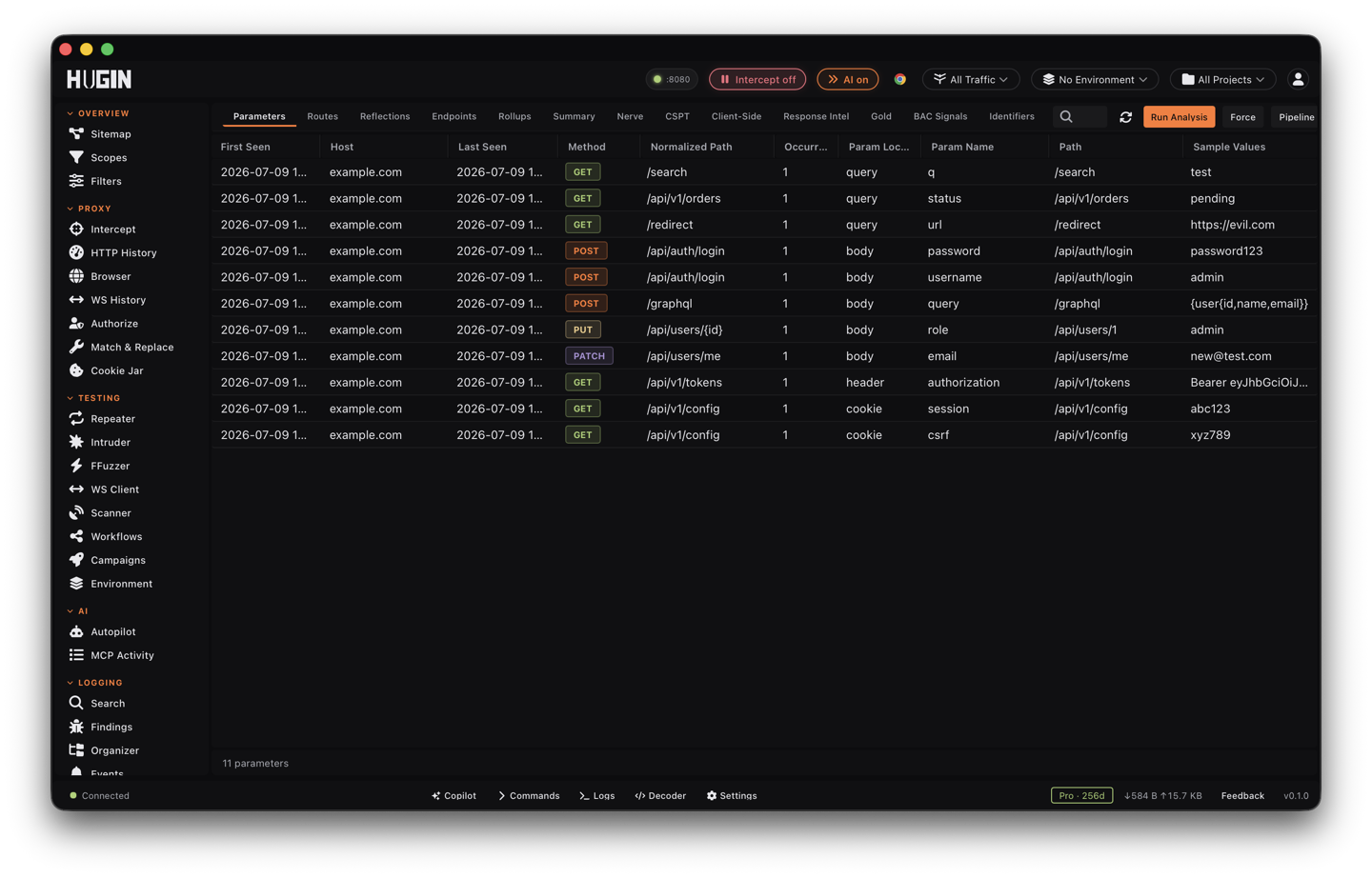
- Parameters, Routes, Endpoints — every parameter and route seen, with counts and per-endpoint detail. Nerve classifies which of those parameters are worth attacking, and its findings show up here too.
- Reflections — values that come back reflected in responses, flagged as XSS candidates. The signal is name-based, so confirm a live reflection in Repeater.
- Client-Side —
postMessagehandlers and their origin-check quality, DOM sinks and controllable sources, and weak origin checks, each with a generated proof-of- concept template. The CSPT tab correlates client-side path-traversal candidates and can hand the sinks to Organizer. - BAC Signals and Identifiers — passive broken-access-control observations and the identifier corpus the access-control engine rotates across identities.
- Rollups and Summary — the security posture rolled up per host.
- Gold — the combined high-value shortlist across Nerve, client-side, and response findings. Start here when you open a fresh capture.
Filter and act
- Tabs group findings by category. The search box narrows by host or any column, and per-tab filters cut the list by severity, type, category, or confidence.
- Every signal is tied to the flow that produced it. Select a row to pull up that flow, then send it to Repeater or the Scanner to confirm.
- Export copies the active tab as JSON for your notes or report.
Leads, not verdicts
Intelligence reads captured traffic and never sends a request, so its matches can be stale or false. It is not the Findings queue, where confirmed Scanner results land for triage and reporting, and it is not the Crawler, which actively goes and discovers new pages. Intelligence harvests signal from what you already captured — confirm anything it flags before you report it.