FFuzzer
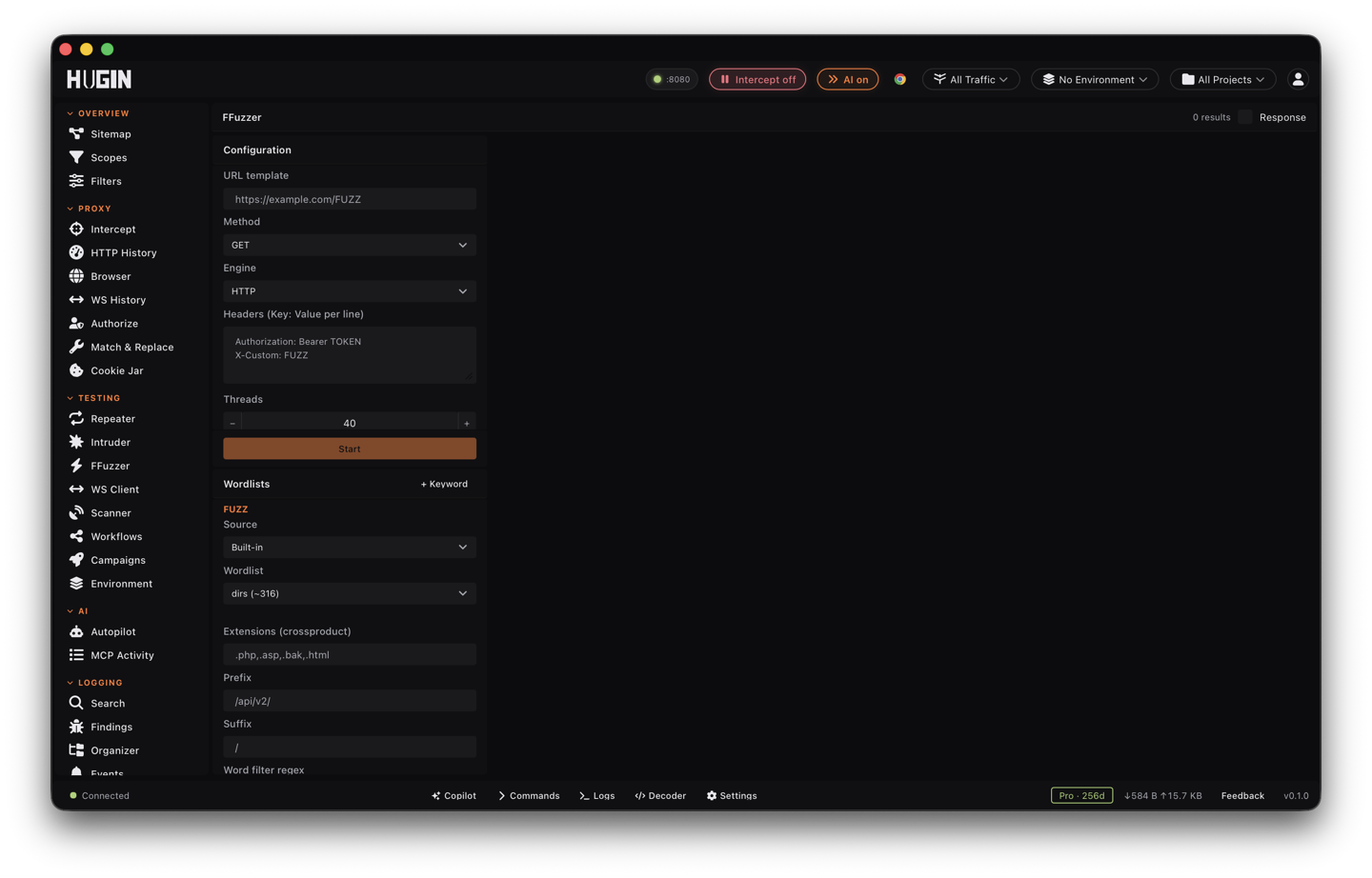
An ffuf-style FUZZ-keyword fuzzer — fast HTTP or browser-driven, with attack modes, payload encoders, matchers, filters, and auto-calibration.
FFuzzer is a FUZZ-keyword fuzzer in the ffuf mould: put FUZZ (and FUZ2…FUZ9
for multiple positions) anywhere in the URL, headers, or body and FFuzzer
substitutes payloads at speed. It shares Intruder's payload sets and
Discover's wildcard calibration.
FFuzzer is a Pro tool (Active Scanner). On Community it shows a locked panel; upgrade to run FUZZ campaigns.
Two engines
- HTTP — raw TCP/TLS requests, fast and concurrent (the ffuf-style mode).
- Browser — drives a Mullvad browser, which bypasses TLS fingerprinting on targets that block raw clients.
Attack modes
FUZZ on its own is a single-position run: one list, one slot. The moment you add
FUZ2…FUZ9 you have to tell FFuzzer how the positions combine — that is the
attack mode (attack_mode), and without it the extra keywords have no defined
pairing.
clusterbomb (the default) tries every combination — the cartesian product of all
lists. Two 1,000-word lists is 1,000,000 requests, so it covers every pair but
grows fast. Use it for unrelated positions, like a username slot crossed with a
password slot.
pitchfork runs the lists in lockstep — entry 1 of each together, then entry 2,
stopping at the shortest list. Use it for paired data, like usernames lined up
with their matching tokens.
sniper moves one position at a time: it walks each keyword's list while the
others hold their first entry, so you see which slot changes the response. Use it
to find the injectable position before you go wide.
With a single FUZZ the mode is ignored — it is a flat run over one list.
Wordlists and payload sources
Each keyword draws from one or more sources, merged and de-duplicated:
- Built-in lists —
dirs,extensions,backups,params,header_params. FFuzzer ships these, so there are no files to manage. - A file — one word per line,
#comments ignored. Pointwordlist_fileat a path, or at an array of paths to merge several. Gzipped lists (.gz) are decompressed on the fly, so you can feed a raw SecLists.gzdirectly. - An inline list — a small array of words for a quick, targeted run.
- A command — FFuzzer runs one allowlisted, read-only tool (
cat,grep,awk,sort,uniq,find,shuf,sed,cut, and similar) and turns each line of its output into a payload. It is not a shell — no pipes or redirects, and a 30s cap. To feed the output of something heavier, write it to a file first and load that. - A saved wordlist — type
wordlist:NAMEin the file or inline field to pull a list you saved in the Wordlists view. That view's copy button hands you the exactwordlist:NAMEtoken.
For multi-keyword runs, give each keyword its own source with the wordlists map:
"wordlists": {
  "FUZZ": { "file": "/opt/SecLists/Discovery/Web-Content/raft-large-dirs.txt" },
  "FUZ2": { "builtin": "extensions" }
}
Top-level wordlist options still feed FUZZ when it isn't listed in the map.
Shape the list before it fires: cross-product every word with a set of
wordlist_extensions (admin → admin.php, admin.bak), add a
wordlist_prefix or wordlist_suffix, force wordlist_case, bound entry length,
or keep only entries matching a wordlist_filter regex. shuffle randomizes the
order so you don't fire a tell-tale alphabetical sequence; wordlist_skip and
wordlist_limit slice the list to resume an interrupted run or test on a sample.
Encode payloads per keyword
Encode each payload after it leaves the wordlist but before it lands in the
request, with encoders. Give a keyword a comma-separated chain and FFuzzer
applies it left to right:
"encoders": { "FUZZ": "b64encode,urlencode" }
A plain string is shorthand for FUZZ. Available encoders: urlencode,
double_urlencode, b64encode, b64encode_url, hexencode, md5, sha1,
sha256, lowercase, uppercase. Chains cover the common cases — Base64 then
URL-encode a JSON value, double-URL-encode to slip a payload past a decoding
layer, or hash a word to probe a predictable token.
Matchers, filters, and calibration
Matchers keep responses; filters drop them. Both read the same response signals:
- status — a code or range (
200,301,200-299). - size — body length in bytes, exact or range.
- words — whitespace-separated token count.
- lines — line count.
- regex — a pattern that must appear (matcher) or must not appear (filter) in the body.
- time — response time in milliseconds; keep only fast responses
(
include_time_ms) or drop slow ones (exclude_time_ms) to cut tarpits and error pages.
Set include_* to whitelist and exclude_* to blacklist. Combine matchers with
matcher_mode (and, all must pass — the default; or, any passes) and filters
with filter_mode (or, any filter drops — the default; and, all must agree).
Content type shows in every result row and the CSV, but you don't match on it —
key on size or a body regex instead.
Auto-calibration is on by default. Before the run, FFuzzer sends a few random
probes; if the target answers them all the same way (a soft-404 or catch-all), it
records that fingerprint and silently drops every response that matches it, so a
wildcard host doesn't bury you in false hits. Turn it off with auto_calibrate
when you want the raw responses.
Recursion
Turn on recurse and FFuzzer descends into directories it finds and fuzzes inside
them, down to recursion_depth (default 2). The strategy decides what counts as a
directory:
- default — only a hit that redirects into a directory (301/302/307 with a
Locationending in/). - greedy — every 2xx/3xx hit is treated as a directory worth descending.
Recursion is HTTP-mode only and needs a single FUZZ in the URL path.
Fuzz a raw request
Paste a whole raw HTTP request — the kind you copy out of Repeater or Burp — into
request, or point request_file at a file, drop FUZZ/FUZ2… anywhere in it,
and FFuzzer parses the method, path, headers, and body for you. It defaults to
HTTPS; set request_proto to http for plaintext. Content-Length is recomputed
for every payload, so a body FUZZ always sends a correct request.
Pace it and slip past defenses
Tune throughput and footprint per run:
concurrency— parallel requests in HTTP mode (default 40). Browser mode is always sequential.rate— a hard ceiling in requests per second, enforced across all workers regardless of concurrency.delay_ms/jitter_ms— a fixed pause plus a random jitter on top, so you don't fire on a fixed interval a WAF can fingerprint.timeout_secsper request (default 10) andscan_timeout_sfor the whole run (default 300).waf_strategy— how to react to 429/503:stop(abort after 3 straight blocks, the default),backoff(exponential 1s → 2s → 4s → 8s → 16s, recovering on success), orretry(keep going on your delay, abort after 10 straight blocks).
Proxy and replay
Route the whole HTTP-mode run through SOCKS5 with proxy — pass mullvad for the
Mullvad exit. (Browser mode already drives the Mullvad browser, which also defeats
TLS fingerprinting on targets that block raw clients.)
replay_proxy is sharper: it sends only the matching hits through a second proxy,
asynchronously, so the scan stays at full speed. Point it at your Repeater proxy
or another tool to capture clean copies of just the interesting responses.
Run it as a session
Start a run and watch it live: total, completed, found, and errors update as it
works, and you can stop it at any point. Pull results as they land rather than
waiting for the end — a driver polls status for progress and results for new
hits since the last offset, and stop cancels. When the run is done,
Export CSV writes ffuzzer-results.csv with the input, status, URL, size,
words, lines, time, and content type of every hit.
Hits that land on a sensitive path — .git, .env, a backup file, a debug
endpoint — are classified and promoted to Findings with
a CWE, so path discovery feeds your report directly. Switching projects stops any
running fuzz, so hits never bleed from one workspace into another.
Reach for FFuzzer when you want raw speed on a FUZZ point — paths, parameters, or values at volume, straight to CSV or Findings. Use Intruder for deep tampering of one request with its processor pipeline and grep-extract, and Discover for structured content discovery with sensitive-path classification.