Scope
Define the target with include/exclude patterns so every tool stays on it — and off everything else.
Scope decides which hosts are part of your test. It is two lists — include and exclude — of patterns. Set it early: it keeps History readable, keeps the Scanner and Intruder on the target, and is your first guard against testing something you are not authorised to.
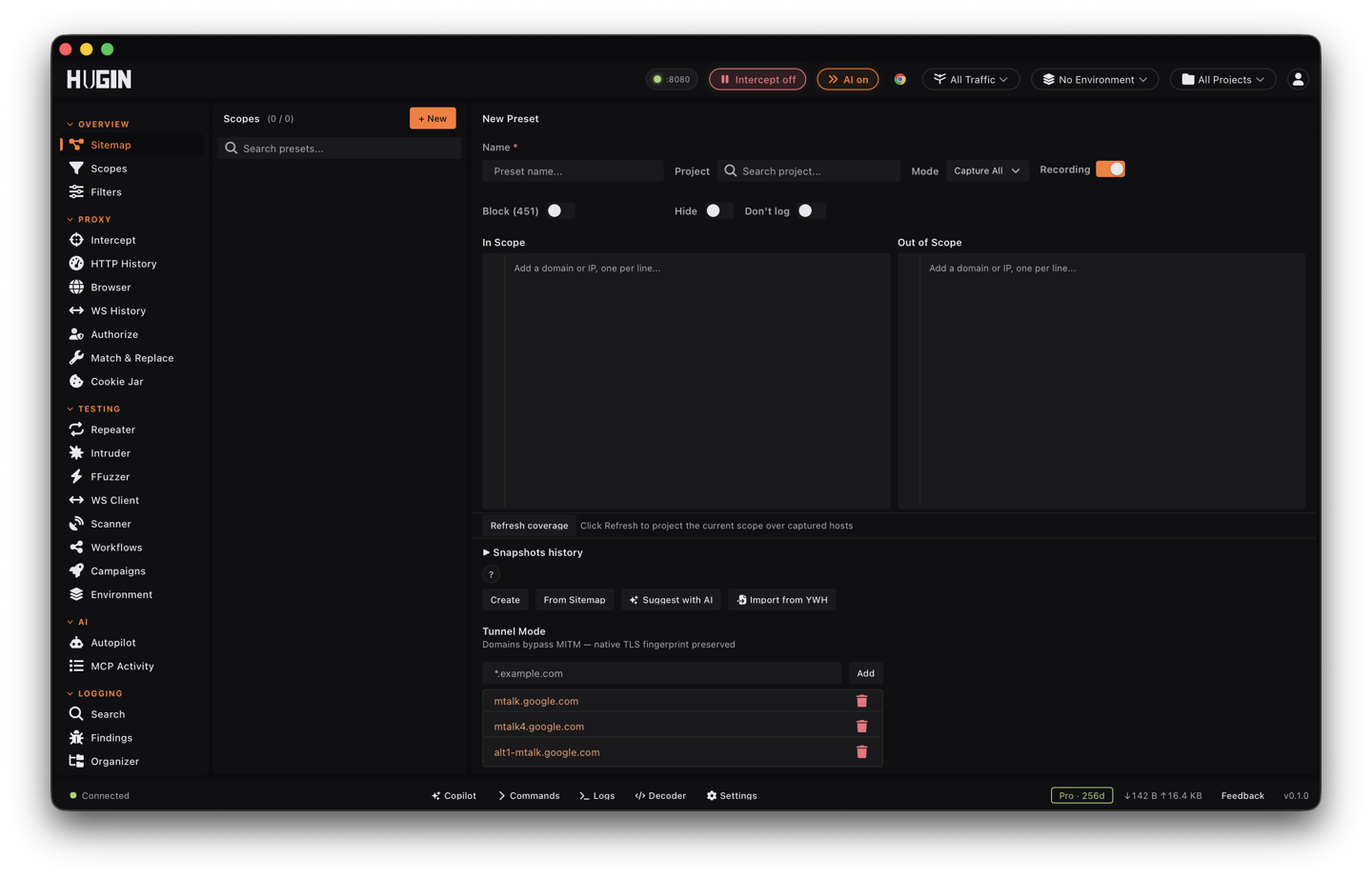
A scope pattern
Each pattern has a type, a target, and a value:
- Match type: Wildcard (the default), Exact, Regex, or Contains.
- Target: Host, Path, URL, Port, Protocol, IP/CIDR range, or a Header
(
Name: value). - Host patterns include subdomains by default (apex plus
*.host).
An empty include list means "capture everything". With patterns, a flow is in scope when it matches the include list and does not match the exclude list — exclude always wins.
Author rules fast with the line editor
Each scope list — In Scope and Out of Scope — is a line editor. One line is one rule, and which list a line lives in decides include versus exclude; the prefixes decide everything else. Type a bare domain and you get a wildcard host rule that covers the apex and every subdomain. For anything beyond a plain host, prefix the line. The grammar round-trips: what you type is what the editor shows back.
*.example.com
exact:admin.example.com
path:/api/*
url:https://example.com/internal/*
port:8000-8999
protocol:https
cidr:10.0.0.0/8
header:Origin: *.example.com
regex:^api[0-9]+\.example\.com$
tunnel:*.akamai.com
# *.staging.example.com
Prefixes stack left to right in a fixed order: an optional # to disable the
line, then tunnel:, then a target, then a match type, then the pattern. So
path:regex:/api/v[0-9]+ is a path rule matched as a regex, and # tunnel:url:...
is a disabled tunnel rule on a URL.
- Target prefixes:
path:,url:,port:,protocol:,cidr:,header:. No target prefix matches the host. - Type prefixes:
regex:,exact:,contains:. No type prefix is a wildcard.
A leading # disables a line without deleting it — the line stays in the editor,
commented out, so you can flip it back on later. Every regex: line is compiled
as you type: a line that will not compile gets a ! in the line-number gutter and
an error row with the exact regex error, so a broken pattern never goes silently
inert on the matcher.
Match-type nuances
*.example.com matches the apex and every subdomain. prefix* is a starts-with
and *suffix is an ends-with against the whole value — note that *example.com
(no dot) also matches notexample.com, so prefer the dotted form for subdomains.
A bare host like example.com covers its subdomains too; use exact:example.com
to pin the apex alone. A wildcard only works at the edge of the value — for a *
in the middle, switch to regex:.
port:443 is one port, port:443,8443 a set, port:8000-8999 a range, and you
can mix them: port:80,443,8000-8999. port:* matches any port.
cidr:10.0.0.0/8 and cidr:2001:db8::/32 scope by network, IPv4 and IPv6 alike.
A bare address (cidr:10.0.0.1) is a single host (/32 or /128). A CIDR rule
matches the request's IP — a host that is already an IP literal, or a client IP
where Hugin has one — so a DNS name never matches a CIDR rule on its own. Useful
for a VPN-fronted program scoped to a range.
protocol:https also matches wss, and protocol:http matches ws, so one rule
covers a page and its WebSocket upgrade.
header:Name: value-pattern scopes by a request header — header:Origin: *.example.com,
header:X-Tenant: acme. The header name is matched case-insensitively; the value
follows the line's match type.
Case sensitivity is a footgun. Host matching ignores case (DNS does). Path and URL
matching does not — path:/Admin will not match a request to /admin. Match the
case the server actually serves, or write the rule as a regex with an inline flag:
path:regex:(?i)^/admin.
Capture modes
The scope mode controls what the Proxy does with traffic:
- Capture all (default) — record everything, scope just tags what's in.
- In-scope only — record only the target.
- Out-of-scope only — the inverse, for isolating third-party noise.
- Capture all, tag out-of-scope — record everything but mark what's outside.
For out-of-scope traffic you can independently block it (returns 451), hide it from History, or capture it but not save it.
Pause recording while you configure
Recording pause freezes capture without stopping the Proxy: traffic still reaches the target, but Hugin writes no new flows to History and pushes none to the other tools. Existing flows stay put. Use it while you edit scope or run a background job, then switch it back on. It is global — to silence only out-of-scope traffic, use the "don't save" option from Capture modes instead.
Tunnel mode
A pattern can be marked tunnel, which passes that host straight through without
man-in-the-middle (MITM) interception — useful for a target that pins certificates
or fingerprints the TLS handshake and would break under interception. Mark a single
line in the editor with the tunnel: prefix (tunnel:*.akamai.com), or manage a
domain list under Tunnel Mode in this view.
Presets, snapshots, and a safe apply
Three ways to keep scope under control across targets and over time:
Save the current In/Out lists and mode as a named preset, then load it on the next engagement. Presets sit in a searchable library and can be tied to a project, so switching projects brings the right scope with it.
Before you tighten a scope, save a snapshot — a timestamped copy of the whole
config, per project, with an optional label like pre-tighten 2026-04-25. Restore
rolls the live scope back to that copy; delete needs a confirm so a misclick can't
drop one.
Hover Apply to Live Scope and Hugin shows the change first — +N added, −M
removed, and whether the mode changed — computed against what is live right now. A
no-op apply is disabled, so you never republish scope for nothing.
Check what a scope really covers
Rules are easy to get subtly wrong. Two tools show you the truth before you trust them.
Refresh coverage projects the current scope over the hosts you have already captured and reports how many land in scope and how many fall out, with the out-of-scope hosts listed — the fast answer to "given what I have browsed, what does this scope actually catch?"
The scope test is a dry run for a single URL: ask "would this be in scope?"
and Hugin returns the verdict — in scope, whether it would be captured, whether it
would be tagged out-of-scope, and whether it would tunnel — against either the live
scope or a candidate config you have not applied yet. Pass a client IP to exercise
a cidr: rule, or headers to exercise a header: rule. It is on the scope tool
over the REST API and MCP.
Import a program's scope
Stop retyping a program's scope by hand.
Import pulls a program's in- and out-of-scope assets straight from HackerOne, Bugcrowd, Intigriti, or YesWeHack and turns them into host rules on the active project (or the global scope when no project is active). Add the platform's API token under Settings → Integrations first; YesWeHack public programs load without one.
From Sitemap reads the hosts you have already captured, collapses them to wildcard
root domains (Public Suffix List aware, so co.uk and friends fold correctly), and
adds them to the In Scope list, skipping duplicates.
Suggest with AI reads your captured traffic and proposes in- and out-of-scope patterns, merged into your lists without overwriting what you typed.
Under Settings → Scope, paste a host list or load a .txt, .scope, .json, or
.list file — one host per line, # lines ignored — to append host rules. The
whole config also exports to portable JSON and imports back with merge (add to
what is there) or replace (clear first), through the scope tool over the REST API
and MCP.
Used everywhere
One scope, every tool. Once set, it is the single filter the Proxy, the Scanner, the Intruder, the Crawler, and Repeater all read — and the recon and analysis tools honor it too: Intelligence, DOM Invader, and Endpointer all skip out-of-scope flows. Set it once and the whole tool stays on target. Not sure a rule will catch what you mean? Run the scope test first.